26/02/2021

Podcast, Scottish Summit, Virtual Ignite and more

 On wednesday this week I have a great visitor at my Norwegian podcast. MVP Malin Martnes was there where we spent about 30 minutes talking about CRM and Teams.

You find the podcast here or where you listen to podcasts. Did you know that all my guests get a few stickers for they computers. 

This is the Sticker you get!!


Tomorrow I will have a session and work at the Scottish Summit Virtual 2021.  Hope you got at ticket and that you will join my session at 11:00 AM CET or 10:00 AM GMT. The sessionen is named Direct Routing vs CallingPlan.

22/02/2021

Scottish Summit Virtual 2021 and more

 Another week and it's been a few weeks since last time. So what's new?

Scottish Summit Virtual 2021

I will speak at this virtual event. What I bring to the table is 45 minutes where I explain the difference between Direct Routing vs Calling Plan. Why, how and when. And some nice Lifehacks as well.
So on february 27th at 11AM (10AM GMT) I will do this.
I will also do voluntary work this day also for the Scottish Summit. Hope you will have the time to join this show tons of good stuff.

Something else

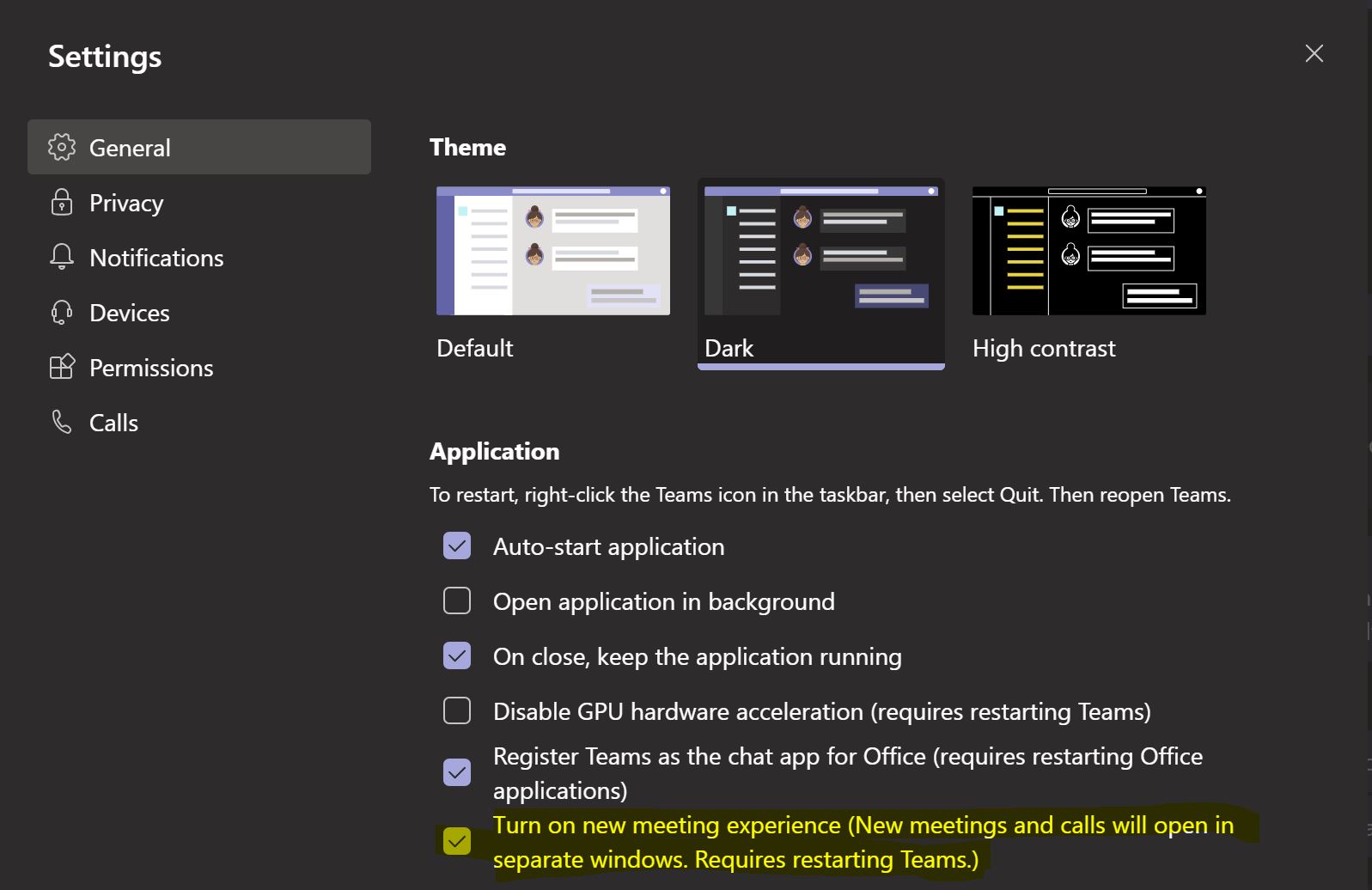
One of the things I noticed is that you now can have multiple popout in Teams. 
Read more about it here. Just look for this 
Well that's all for today. More later to come.

03/02/2021

Preview - Podcast and some great feature

 New month and here comes some news stuff. If you is like me who loves new features in Teams well, why not try out the preview of Teams features?

28/01/2021

Tendfor - Teams- PSTN Calling

Well folks, I have known this for a while but now it's out. PSTN Calling for switchboard using Graph API is here. First out is ofcourse Tendfor. If you click on the link you will find all about in LinkedIN where they published it.

19/01/2021

Cool new stuff for Teams

YeaLink new products

Yesterday I was on pre-recorded webinar with Yealink. This was about the new products that are just around the corner.

This was some of the tools they showed at 


Based on what I saw there, this is pretty cool. You can answer a Teams call and place this on hold when you get a mobile call. Then merge all those into a conference call. 
Looking forward to get my hands on the YeaLink WH66. And from what I have heard it will come after the Chinese New Year and the price is real good.

12/01/2021

Channel calendar - New feature

 The new year just start with a new feature in Teams. Here comes the Channel Calendar.


This is great new feature for Teams. 

Important about the channel calendar!!!!

I have tested this out and found that this feature is not a part of the "private" channel. You can use is in a open channel, but not in private. It's important to be aware of this!!!

And one more thing, it's just 199 days until Skype Online is switched off.

06/01/2021

New Year and lot's happens

 First of all happy new year. Let's hope 2021 will be better than 2020. But things happens around the world and here some news.


Podcast

I started at the end of this year a new podcast. It's in Norwegian and is called Teams Cast Away and you find here on Spotify. Soon Episode #2 will be out. 


17/12/2020

Retirement of Skype online connector

 Now will Micrsoft retire the skype online connector. I got this mail now.

We will be retiring the Skype for Business Online Connector on February 15, 2021 for all Skype for Business Online or Teams customers. This will simplify the admin experience by moving to a single PowerShell module for managing Skype for Business Online and Teams. Moving forward use the Teams PowerShell module, which is where we will continue to invest.

[Key Points:]

  • Major: Retirement
  • Timing: February 15, 2021
  • Action: Review and assess the impact for your organization.

[How this will affect your organization:]

Administrators will no longer be able to download and use the Skype for Business Online Connector to manage online organizations and users after this change is implemented.

[What you need to do to prepare:]

Instead of using the Skype for Business Online Connector, we require using latest release of Teams PowerShell module.

Resources:


16/12/2020

Last full week before Christmas, here are some news

 As mentioned earlier, the clock is ticking. And please read this blogpost so that you are not confused on what service Microsoft takes down and what has still support and can be running.

This is importantent to know about. 

And here are some news for us who have Telephony in Teams.


The one marked yellow is now show both mobile and teams numer if you have this is your AD. Real nice feature.

Then we got the new meeting join experience. This is real nice I think. 

This I think is a real nice feature for all of us out here, and I like the preview on video first.

Real soon we also get the new 1:1 recording feature. I have earlier written about it and read more about it here.

This is all for today, and I will be back soon with another blog 


14/12/2020

Teams, it's time for some rules and pointer to get Teams to work

 As many has started to use Microsoft Teams, well it's time to stop and take a breath on the ground. 

We has been working from home the last 9 months. We have got the #WFH tag and many companies sees this as the new normal.

But this is not what I want to write to you today. What I want to talk to you about is Teams and some of the pitfalls.

10/12/2020

Breakoutrooms are here

 Yesterday I saw on LinkedIN and on Twitter. Breakout rooms are here.

Read more about it here.

#StaySafe

09/12/2020

SBA is out in Public Preview for Teams

 As many out there has their SBC running in their datacenter and not by an servicepartner or Telco who has the SBC as a service. 

For you there is a important new stuff that has come in public preview, and that is the SBA (Survivable Branch Appliance) for direct routing.

You need to talk to your vendor and mostly upgrade your SBC to have this support. 

So why should you add on a SBA? If you have an internet outage this can be usefull to remain telephony in Teams. 

03/12/2020

Wooo Webinar for KEMP done

 What end for a great day. Now just finished with a webinar for KEMP. The preperation has been done together with great people like Frank Yu, Hugo Faria, Andrew Casey and Noemi Toth. We all in different contries, parts of the world. And let's don't forget Mikael Lange who had this idea for me to come and speak.

Here are some short info about it:

  • TMG Forefront is dead (RIP)
  • Why Always on VPN and not Direct Access or Classic VPN.
  • KEMP ESP pay for it and get the good stuff
  • How to migrate from Lync/Skype to Teams and SBCaaS or onprem SBC, you call.
  • You as a customer is the "commander in chief"

The webinar was recorded and you will be able to watch it here 


What's hot in Teams November 2020 edition

 Here we go, soon Christmas is comming up. WFH is the standard at the present time.

Here are the  News Teams November 2020


02/12/2020

New stuff like personal recording and more

 Today it's just 240 days left before Microsoft shutdown Skype Online. As mentioned last week it's now time to act and start the trip to Teams Only.

So I heard the news today, here comes the news on what's comes and what's hot in Teams

24/11/2020

35 weeks and counting

 Well now its 248 days for the Skype Online shutdown today, are you ready? Well it's time to get ready.

During the last week many of you have been into my guest apperance on the podcast of "bluescreen brothers". Great :-) 

This week has been so fare brilliant. Moving users from Skype On-prem to Teams. Planning for about 5-700 users this week. All with telephony in Teams.

18/11/2020

Time to move on - Podcast & more

 The clock is running fast for the switch off for Skype Online. At present time (18.november 2020) there is 37 weeks left. Are you still thinking about moving to Teams, well now is the time start this project. 

02/11/2020

What's new in Teams October 2020 edition


 New months, and here is a wrapup on what's new in Teams October 2020. 

According to this blog here is what's new.

20/10/2020

Breakout rooms allow meeting organizers to split main meetings into smaller sessions for focused discussions

 This morning I got long waited email for a new feature that has been written page up and page down on. It will now be rolled out in November according to the mail.

So, what is all about?

13/10/2020

Added Knowledge during Covid-19 and filled up with MS-700 and assigment

 Since the middle of March I have mostly worked form home. I guess that I can count on my hands the days I have been to working at the corp office.

Lots of customers has been going to Teams, and migrating them from Skype for business server 2015 and move to Teams with telephony.

But up in all that I have also documented my skills regarding to Teams.

08/10/2020

Teams and HELP function

 Ignite has gone online and was the end of last month (22-24 september 2020), TeamsFest October 2020 is finished (7th october 20202). MVP-dagen in Norway is today (8th October 2020) and is an online event.  Teamsdagen Studio in Sweden will come online soon.

Lot's happens in the Teams communites now. 

Today I will talk about the new HELP button in Teams 


15/09/2020

Small change but important for many - tip of the day

 This morning I was testing some CMD's in Powershell and made a discovery.

I started up my powershell and logged in with my account for this.

09/09/2020

SAFE transfer of calls in Teams

 Today I woked up to some great news. The new big thing in Teams is SAFE transfer. 

The first I saw on Twitter this morning was from @pl_lange (Paul Lange) who had something about it. Thanks Paul.

So here is the functions and how it works.

01/09/2020

Whats New in Teams and Addons - Switchboards - Recording

New month and time for a blog again. First of all, as every frist of month is that Microsoft is presenting a wrapup on what's new in Teams the last month.

Read about it here.

27/08/2020

Kemp, Exchange 2010 and Teams, lot's to talk about

 From KEMP I got the latest blog. It's about Exchange. First I'm not an Exchange expert. I know a lot about KEMP, Skype and Teams. 

The blog contains information about Exchange 2010 support ends and it's now time do upgrade. Read what MVP Jaap Wesselius think about it. If your customers still runs Exchange 2010, well now its time to do some action.

07/08/2020

Just love popout in calls and meetings

 During the last month there has come some new fuctions. After 4 weeks off work, I have now been trying this function for about 2 weeks.

The function I talk about  is Popout meeting and calls.

So what does the call window looks like when it has out. Well like this

When working on two monitors this is something I have been waiting for a long time.

Have a great day out there #StaySafe

31/07/2020

Less than a year to Skype online switch off!

When I got to work this morning something hit me.


It is now less than a year until Microsoft has told the world that they will do a switch off on Skype Online. 
Well folks it's now time to start your travel and migration to Microsoft Teams. 

If you are running Skype for Business onprem, well you as still safe and can  do so for the next few years.

Want to follow the countdown, just go here: Countdown

24/06/2020

Teams, Outlook contacts

I have got quite lot's of questions about outlook and teams contacs. This need futher investigation to figure this out.
Frist I came over this post in the tech communities Add company name
Then I read and added this and they showed up. 
But I could not figure out why all contacts needed company name, so I posted this question.

Then someone start to push me to do some more testing. And here is my conclusion.

1. If you add a new contact you don't need company name or email, just name and phonenumber. The phonenumber does not need to be on E164 can be strait forward.  Restart the teams client and it shows up under Calls - Contacts.
2. If you have an old contacts that does not show, just do a change on it and it will show up.

This has been tested on a clean Exchange online (no-hybrid). 

This will be the last blog in some time due to that I am going on 4 weeks vacation next week. Have a great summer and #StaySafe

15/06/2020

S4b to Teams

For my norwegian readers I had last week a webinar talking about the road from Skype for Business Onprem til Teams with Telephony.
This is the webinar in a nutshell. Happy reading

27/05/2020

WFH, service needed, uptime is more important then ever

Hi again. There has been some time since I wrote about Loadbalancing. So here we go.
The world has changed due to Covid-19 situation. Most of us who are working, well we work from home, here by shorted as #WFH, or just WFH.
This gives IT operations lot's of things to think about. Services need to be up and running all the time. There are lot's on employees that is working from home use VPN services, and out this way on companies internet connections.

22/05/2020

New CU for Skype for Business server 2015

It has been a while since the last update from Microsoft. In August 2019 we got CU-10. And for a some days ago we got the CU-11. Microsoft made it public the 13th May 2020.
You will find it here: https://www.microsoft.com/en-us/download/details.aspx?id=47690

I have not tested it yet since most of my customers has moved to Teams with telephony.


06/05/2020

April 2020 update - May first edition

Well, it's been some time ago since the last blog here. But here we go again.

Security in Teams 

There has been a lot of news regarding security for the UC platform. In 2018 Cisco got some issues regarding GIF. This has been fixed.
Then Zoom got the same issue and even more issues. Read about it here and I suspect that it will be fixed soon.

01/04/2020

Major changes for the SMB - You got Direct Routing if you want

There has been today major changes to functionally regarding to where the customers who has Office 365 Business Essentials, Office 365 Business or Business premium.
They can now buy Microsoft 365 Business Voice (without calling plan). They will now get Phone-system and AudioConferencing included.

03/03/2020

February 2020 summmary

The second month is gone in hurrycane. Corona is here. And why not just work from home and use Teams? With enterprise voice in Teams, and you are good to go. Use it for meetings, teamwork and phonecalls. This is how I can use my Teams client.

But what a month this has been and here comes a summary of the news that has happend in Teams.

20/02/2020

Youtube video - Tendfor, Office App and Commsverse

Since there a great numbers of you who reads this blog, here is a new one.

Youtube Teams pÃ¥ Norsk, is my YouTube channel. Last week I created a new video. Watch it her: https://www.youtube.com/watch?v=3OE-rkWLWtQ&t=29s

This contains information on Tendfor switchboard and how to create emergency messages and how to use them.

13/02/2020

Graph-API give you presence in switchboard Tenant

One of the product I have worked with the last 3-4 months and where I do have customer running live since Graph-API was in beta. Yes you read right. These customers was the first in the world to go live on Teams Graph-API.

29/01/2020

Zoom, MS-700 Certification and more

There are lot's going on in the Teams world at the present time.
During this weekend I have together with my co-workers just move a customer from Skype Onprem to Teams with telephony for 300+ users. One of the cool stuff we did was to add SIP-registrar on Poly TRIO 8800 and on Poly VVX-311 also. For the TRIO 8800 we also added the new feature named USB PassThrough since they have Visual + in those rooms. And it's cool to report that everything works just as it should. Want to know more please contact us on Teams at blinQ.

21/09/2019

Use Teams in Chrome new feature

Today I saw someone on LinkedIN say that you can call from Teams using Google Chrome.
Cool this I need to test:

And it works. Before you could only use Edge to do this now its coming to a browser near you. Soon I think it will be possible to use Firefox also.
To get this working you need:
1. SBC
2. Direct Routing
3. Phone system
4. Knowledge or someone who knows how to deliver your SBC or a provider who can deliver SBCaaS. Want to know more please contact me her: Teams blinQ

21/05/2019

Find numbers in Teams, AA and CQ, used and unused

One of my best friends and ex-COWorker has made an script where we can find what numbers are used and what is free.
This has been something several people has done for Skype for Business. Well this one is the first I have seen for Teams.
You will find it here: Find Free phonenumbers

If you use it give him som credit for it :-)

05/05/2019

New settings in CQ and AA

CQ and AA? What? well CallQueues and AutoAttendant. Lots of new changes there.
On Friday I started to look into this. And there are some major changes:
First it has been moved from the legacy portal to Teams portal (huge step).
It now looks like this:
Then you need a Resource account who is defined under Org-Wide-Settings. When this is made you need to if you shall use this with Direct Routing, it need an licence. Then you can use E1,E3 or E5 and you need to add phonesystem aswell.
When that is done you can just follow this guide: https://docs.microsoft.com/en-us/microsoftteams/manage-resource-accounts

Now you can start to build your CQ and AA.

30/04/2019

Teams new features in the call sections and more news

As many who has Phone system to have Microsoft Teams as your telephony solution, you might have noticed this changes.
You can now add more groups here, and if you have turned on the Call Park feature in the admin you can pick them up here as well. Lot's of new stuff is happening. The application is still under development and new features comes all the time.
More news and information futher down here:

18/03/2019

Teams admin portal update

As many of you know already the Skype/Teams portal has changed name to
nothing new here to report.


21/02/2019

Teams - Integration - Learing like a pro

Been a short break here but I'm back. There been plenty going on lately. As some of you have noticed I have published an post on LinkedIN. This has started to get viral
My post on LinkedIN and I hit a nerv here.

10/02/2019

Teams - Personal Status - As in Skype4B

This is a nice feature that we who has used Skype for Business for a while remember
As we can see under your normal status you can now type in your personal status or let Outlook Out of Office be a part of it.
Press the pen and edit it for your time period
Nice feature and great that you can have it for a time period.

Want to know more about Teams, and Telephony in Teams (aka TiT) contact me and we will show you how it works.

25/01/2019

KEMP Loadmaster on Nutanix

One customer of mine has start to migrate from VMware to Nutanix. This meens we had to move the KEMP VLM they had as a reverse proxy.
The first we did was to see that the old KEMP was in the right version for a move.
Then I took a backup of it including the certs and all the config.
Then we downloaded the file from KEMP support and began.
First we unzipped the file and moved the tar.gz to a linux server. Then my customer did some magic and we imported the image to the Nutanix plattform.
Then we created the new server, remember to choose IDE disk and not SCSI. If you choose SCSI the VM will come up but then terminate.
Then restore the old config and cert and then reboot.

Thanks to the Einar at the customer for find out about the IDE vs SCSI and that we did this real fast.

18/01/2019

Teams on the move

There are lot's happening around me during these days. Have been real busy talking to different companies that want to build a POC around Telephony in Teams, or as I call it TiT.
Since we start to work hard on the the customers just want it.  They see the advantages that have everything in the cloud, and not on a internal datacenter.

Another interesting thing is that SBC in Azure from AudioCodes has been certified for Azure, and that the image from Azure is now working as it should.

There are also lot's of new feature sets comming to Teams, and more is still to come. One interesting thing is that we look forward on what will happens on the API futher forward. When vendors like Competella and other will get their hands on this API and be ready to make a full blown switchboard and ContactCenter solutions with good statistics and more.

Then we can start to fade out Skype for business onprem and move everyone to Microsoft Teams with TiT.

I also read something the other day that Teams and the numbers of users will double this year and next year after that.

So GO TEAMS.

04/12/2018

Teams - Powershell

This week started off with a bang...new version of Powershell.
Powershell Teams v.0.9.6

If you is like me and has the 0.9.3 who was the old one just run the command
Install-Module -Name MicrosoftTeams -Force
to get it installed and you will get noticed that you have to either answer yes or A [yes to all].

As some of you have noticed we also got new Icons who will be installed soon. Just to wait and it will be there.

There are a lot going on in the Teams world now. Voice in on client works, customers are moving to Teams with telephony, and this is great.


26/11/2018

Microsoft Teams - Statistics - AA and CQ

First of all. Under one month to Christmas. It's been a long time since my last blog out here. Been occupied in the name of Microsoft Teams.
One of the things I sees who are missing is when it comes to Statistics on the PhoneSystem. This has to do with AA and CQ.
AA you think, What is this? AA = Auto Attendant, where you handle opening hours, IVR functionality and so. Basic routing of calls to Microsoft Teams.
CQ what is that, its the second part of AA, CQ= Call Queues, where we route trafic to spesific Groups like we do in AA. but to build next level of this.
 This can't be so that when you call an AA or CQ you see talk time, phonenumer to who has called and what number the person has called into, and when it arrived. But you can't find out how has answered it.
This is real bad. I have spoke to Microsoft about this and there will come something new about this, but we don't know yet.
To get help we need people like you who read some of this to go here and vote.
https://microsoftteams.uservoice.com/forums/555103-public/suggestions/20168716-reporting-capabilitie...
and for this one as well
https://microsoftteams.uservoice.com/forums/555103-public/suggestions/35920921-basic-reports-and-cal...

I'm sure that something will change about this, when you look what happens to API in Microsoft Graph.

Have a great week out there where ever you are.


05/10/2018

Moved from S4B Online to Ms-Teams, and some news also

Since i will do this breakfast meeting the 11th. October. I did last week a switch to MS-Teams Updated with this Powershell command:
Grant-CsTeamsUpgradePolicy -PolicyName UpgradeToTeams -Identity first.lastname@contoso.com

And from Skype for Business I now get this one :-)
This is great I think. I have my voice functionality in Teams. Did not have this in Skype for Business. But as many have seen, there are still some missing points out here.
1. Outlook need to show presence. Is not ready yet.
2. one to one share desktop like we did in Skype for Business without to set up a call, direct from IM/CHAT.

But there is lot's of things happening that is real nice.
1. Integration with Video Interop, with PexIP, Polycom that is nice.
2. Blur video call

Based on just running Teams so far, I think it's alsmost ready to move over. But if you have complex contactcenter or switchboard, you should run Teams in Island mode together with Skype for Business and make your users ready to learn how it works.

And there will come lost of new features soon also.
From Ignite this is what they told there

21/09/2018

Session on voice in MS-Teams

As many have noticed so have I worked together with some coworkers a solution about voice in Microsoft Teams.
This is a product that we are ready to marked with. It's for partners, end customers. It's placed in Azure, and it's multi-trunk, multi-tennant, and placed in different datacenters.

The 11th Oktober shall blinQ AS together have a session in Norwegian at Microsoft Norway regarding this subject.
Read all about this here:
forkostseminar tale i teams

Hope to see you there.

25/08/2018

Great fun with MS-Teams, callqueues and Auto attendants

Since I just love tech, new stuff and has worked as many of you know with voice and telephony solutions since 2001. I had to try the following out:

1. Create an Auto Attendants from the legacy panel in O365 and give it some phonenumbers and record a message with a welcome to <my company>.
2. Create a phrase that contains Press 1 for this and press 2 for that.
3. Then I had to make 2 Callqueues name customer service and salses.
4. Then make the groups that shall answer the call

So was the big Question.....where shall the call goto? Well since I was a part of the groups, well it went to the group and it ended up in my MS-Teams client who I have voice enabled using the Bring Your Own Telco to O365.

This was quite easy to fix, and I start to see lot's of places where I can place this service and to build more solutions about this.

Great fun on a saturday.

17/08/2018

MS-Teams - BYOT - SIPTRUNK Independent and some SFB2019

Time for a new post, and what a two weeks this have been
First I ended the first week by getting KEMP, S4B-2019 up and running as you already have read about.

The magic happend to MS-Teams

Then we got our SBC running and configured with siptrunks from different partners. Like Voxbone, Phonect and futher more. The SBC is running i Azure, and this meens we can and will terminte the siptrunks into Azure and this has to be siptrunk over internet.
Why are you thinking, well just so that we can deliver any phonenumber almost all over the world for you Microsoft Teams client.
We have produced a multi-trunk and multi-hosted plattform, where you can take your sip-trunk and we can deliver your phone services.
This is BYOT at is best, and blinQ AS was the one to give this to you first. And this will be a SAAS service.
From what I have read, this is the new wine :-) and this is some real new stuff to this plattform. We will for the finance - banking market do recording aswell when this is required.
In Norway we will together with partners have a breakfast meeting for customers, other partners or anyone who wants to learn and find out how we can do this. More about this will come soon.


31/07/2018

Skype4B-2019 KEMP Loadmaster

Yesterday i finaly got my lab running again. This time with 3 frontend server Skype server 2019 Evaluation in a Enterprise Pool, with SQL 2016 all running on Windows server 2016. Then I installed a KEMP Loadmaster VLM running HLB for the frontend pool. Works like a charm.
The next thing is to build a Medation server and Edge server and then connect it all to Exchange Server 2019.

More to come here soon.

25/07/2018

Skype for Business Server 2019 - Evalutaion is here!

Waiting time is over, S4B-Server 2019 Evaluation is out. Time to build this into the lab.
Read about it here:


My plan is to build a frontend pool with 3 servers in a pool, 1 mediation server, KEMP VLM for LBA for S4B, one Edge and all integrated with Exchange server.
The plattform will be running on Windows Server 2016 and SQL 2014 Std edition.

Update will come soon in later bloggs, time to do som lab-work.!


22/06/2018

Sennheiser Headset PRO

Summer is here and this will be last blog post for a while, since I am about to take some vacation.
A little tip before summer is comming over us.

If you add and use this for your headset, well your firmware will always be updated.
https://no-no.sennheiser.com/headset-software-pc

Thanks for reading my blogs and have a great summer.

13/06/2018

Create or delete Team in MS Teams - Restore

I came a cross this on LinkedIN yesterday. This blogpost describe the process if a Team has been deleted from MS-Teams.
Read about it here:
https://blogs.technet.microsoft.com/skypehybridguy/2017/07/23/restoring-a-deleted-team-in-microsoft-teams/

01/06/2018

Competella Upgrade from R2 to R2.5

Competella is one of the switchboard and Contact center providers for Skype for Business. For about 1 week a go they got a new version name R2.5.
When you want to upgrade the prosess is nice and clean. Just an inbound upgrade if you are on R2 version.
If you run Routing Agent to handle your busy-on-busy, well you need to go to build 137. If you have it already, well you don't need to upgrade to this.
Customers has alsread start to request this upgrade from R2 to R2.5, and also to ask for GDPR tuning for Comptella software, where Competella has provided a guide to configure this and make your Competella switchboard  and ContactCenter  GDPR ready.

31/05/2018

KEMP MELA My recording

For some time ago I did a speak for KEMP Technologies about KEMP MELA in real-life.
Watch it here:
https://event.on24.com/wcc/r/1644558/17C31B27F217F0DD7B6922E6421C3A98

It was fun and great experience for me where most of them who watched it live was from central europe. Thanks again to KEMP for wanted me to speak about this.

18/05/2018

Test Jabra Engage 75 [**UPDATE**]

From Tektracom I got the new Jabra Engage 75 MONO today as I wanted to test it out.

Jabra Engage 75 
As we can see we have a docking to charge headset. Listen to music from Spotify works smooth. One thing I think was not so good is that the first I had to do was to update the firmware on it. It comes with an old firmware, but since this is a new headset and new on marked, I was expected it to have the latest one.

After the upgrade it was just a quick config on what I shall use it for.
I have testet it around in my office and since it has DECT standard it works all up at 10th floor when the base was in 8th floor. 
That is real nice and impressing.

Would I buy this for people, YES. As a office headset it's real nice to use.
Since it has DECT it quite expensive but its just fine and nice to use.
I will give it and 5 on the dice.

**UPDATE**
Since it' based on new DECT technologi it will give better distance. I tried it during useing the office elevator here at work, and the cool thing is that I tried it with my co-worker Ivar Naggum, and he keept the call up all time (#Skype4B ) call, and when I got back in the DECT zone it continued the call. Real nice and smooth I think.

03/05/2018

KEMP MELA Webinar 9th May 2018 2pm CET

Hi dear readers.
As mentioned earlier, I will have a KEMP webinar. This is what they say about it.


KEMP Technologies like to invite you to their latest expert series webinar where KEMP All Star Influencer, Kai Stenberg from KEMPCenter Partner, BlinQ AS, will share his experience of implementing KEMP LoadMasters for customers across Europe.
Kai will share his unique insights on how Enterprises are deploying KEMP's centralised application delivery management platform (KEMP 360) and capacity based licensing model (MELA) to achieve greater flexibility, scalability and ROI.

Key Learning Points:
  • Legacy ADC architecture vs. the future
  • The use cases and benefits of Metered Licensing (MELA)
  • Metered Licensing administration
  • Discover how KEMP 360 Central provides centralised management and control of Application Delivery assets
  • CloudX (BIZSKYPE) customer success story


Please sign up and I look forward to have you there.

21/03/2018

KEMP webinar about MELA - Pay as you grow [**Updated**]

As most of you know, I have been granted the title from KEMP Technologies as a KEMP VIP. One case I have been working on is this one:
KEMP MELA - PAY AS YOU GROW
This day I noticed that KEMP has asked me to run a webinar based on the MELA and how it works. This is something I real look forward to do again.
As many of you know I work for the one and only KEMP Center Partner in the nordics. And for me and blinQ AS this is important.
With the MELA you pay for what you are useing. All by the KEMP Central 360 where you can manage your VLM's. Upload firmware, reconfigure or what you want to do.

All this and how, where and why will be covered in this webinar.

[**UPDATE**]
Date and time has now come. 9th May 2018 at 2PM CET link for registration will come soon, so just check in later.

[** UPDATE 2**]
This will be an international webinar on english

20/03/2018

Skype for Business CU Mars 2018 [**UPDATE**]

Microsoft has launched CU for Skype for Business server, this time Mars 2018. This gives build


You can download it here Latest CU Mars 2018

Since my last blogpost about the Desember 2017 this might be one for you. I am about to try it out now. If I find something about it. Be sure to read about it here.

Update!!!!!
After installing it the error contains screen sharing isn't allowed for this contact is now gone.

05/03/2018

Skype for Business server CU desember 2017 [**BE AWARE**]

After installed the Desember 2017 CU for Skype for business Update 6.0.9319.510 there is a huge bug in this versjon.
When clients tries to share desktop they will get this error.


You have to contact Microsoft Support and create a ticket to get the update.  As it say on the post
To obtain this update, submit a request to Microsoft Customer Service and Support through the following Microsoft website: http://support.microsoft.com/contactus/?ws=support
After installing you will then be on 514 for your build.

18/02/2018

My experience with Plantronics Voyager 6200 UC

As mentioned before this weekend I got the Voyager 6200 UC. Since I have the Plantronics HUB installed all the install went smooth even that I am running Windows 10 Insider version.

After listen to music and also had a Skype for Business meeting, well I think this a really good quality headset.

16/02/2018

Plantronics UC-6200

Finaly, after weeks waiting now it's here. This I will look forward to try out.
The design looks great.
Thanks for it Plantronics Norway :-)

Going to write about over the weekend to tell how I it is. #thenextbigthing

08/02/2018

Create Teams Online meeting from Outlook [**SOLVED**]

I am not sure how many out there that has run the invite to a Teams meeting from Outlook. But for me I have never had the ad-in and therefore not able to use it.
So as you might understand, I now has it and here is how I solved it.
From a lots of google search here to try to figure it out I found out this fix.
Great thanks to this blog: https://realtimeuc.com/2017/08/missing-teams-outlook-add-in/

1. locate where you have the addin for Teams. Mine is located here:  C:\Users\<usern name>\AppData\Local\Microsoft\TeamsMeetingAddin\1.0.17306.2\x64
2. make sure you backup your registry before you does something like this
3. copy this registry file and create a .req file in Notepad or other tool to get this.

26/01/2018

Windows 10 Insider and Bluetooth latest in Fastring

As the gadget nerd I am, when running Windows 10 Insider in the fast ring can give some challenges.
The build 17084 that come out yesterday gave me lots of trouble.
So today I had to rollback to get my Senneheiser MB 660 UC to work again.

So now I am running build 17074 after a quick restore. Hope the next version will be better :-)

Have a great one.

04/01/2018

Huddy Camera part 2

I have if you read my blogpost seen that I have got the Huddly camera. I have been testing it on my Surface PRO 4. I use Skype for Business on regular basis.
Today I testet the camera in a Skype4B call with a customer to try it out.
First we connected using the Sureface build in camera, and it was OK. Then I switched to the new Huddly Camera and WOW.
The wide 150 degrees, the zoom and the customer of mine said. WOW what a difference. The way to handle the camera during meeting or call is real nice and smooth.
The size is perfect to bring with your personal computer or if you want to use it in a conference room. I think this will get a lot's of places where you can use this.

If you want to know more or try it out. Please contact me or blinQ AS in Norway and we can help you with this.

02/01/2018

Hyddly Camera

Welcome back to new year and new fun. When I got back from x-mas holiday and returned to my job, I had a new camera on my desk. I got my Huddly Camera.
See more about it on


I have just start to use it and it looks out real good so far. It's small and real compact and the specs is just brilliant. Works well on my Surface PRO 4 on Windows 10. More about testing it will come as soon I got some more to report, but it's nice.
Just download the latest software from Huddly and then you are good to go.

15/12/2017

EWS error, EWS Not fully implemented [SOLVED!!] [UPDATED!!!]

Lately I have start to see this type of error, either where EWS internal URL is blank also the External URL.


The Skype for Business is running on Windows server 2016, Exchange 2016 and Hybrid to O365. After lots of Google on this. Added Kerberos for Skype for Business. Changed OAuth certificate but the client got prompted about for Exchange credential all the time and it did not help at all give this to the client.
It was now time to ask my co-worker Ivar Naggum who is the Exchange Expert at blinQ about this, and together with Alexander Tuvström who was from the customer

07/12/2017

All from headset to Skype4B Hybrid issues to an interview

It's been a while since my last blog. So this will contains a lots that has happened lately.
So lets go........
Yesterday 6th Desember 2017, I was interviewed by a journalist who is going to write something about KEMP Technologies, MELA, KEMP 360 Central. Looking forward when it comes out. Was great, and this how we KEMP VIP's does it. Want to know more about KEMP Loadmaster, well contact me or blinQ AS, and we can give you an introduction to the world of  Harware LoadBalancing and how to use it as a reverse proxy.

09/11/2017

Skype for Business - Windows server 2016

As we know with the CU from May 2017 we now have support fort Windows server 2016.
Today I started to install this Onprem for a customer.
Just be aware of that this blog here tells about it:
https://blogs.perficient.com/microsoft/2017/08/skype-for-business-how-to-install-on-windows-server-2016/
And it works like a charm. I have not tried the registry hack that is mentioned here, but just after step 2 I installed the fix for it, and then the CU.

Good look it works just fine :-)

25/10/2017

Microsoft Teams Roadmap

Yesterday I got an e-mail that made me happy. I got the new roadmap for Microsoft Teams.
You can read all about it here:
Roadmap

The PowerPoint presentation can be read from this link.
PDF Roadmap

Be aware that dates can changes. From my perspective I think this is what IC is about and one of the feature that I like that comes soon is the integration between Skype for Business Persistent Chat and MS-Teams integration.

10/10/2017

Azure Stack - KEMP Technologies

Finally Azure Stack has arrived. In Norway there are different companies that can deliver this service. Azure Stack is Hybrid Azure, where you combine Azure and Azure Stack.
But did you know that KEMP Loadmaster is the one and only LBA/ADC in Azure and Azure Stack.
And if you plan to move your environment to Azure and Azure Stack, and you are already a KEMP customer, then you can move your license to the new environment.
If you new to KEMP and planning to move into Azure or Azure stack, then I would recommend that you talk to a KEMP Center Partner. Complete list will you find here:
https://kemptechnologies.com/partners/directory/

For Norway we have 1 KEMP Center Partner who has the knowledge and has educated sales and tech's for this:
KEMP Center Partner in Norway


04/10/2017

Back from MS Ignite 2017 in Orlando

Last week there was a great time for the Geeks like me. MS Ignite 2017 happen in Orlando. Huge and bigger than ever. They said there was about 30 thousand there. It was so big that they had to have it in 3 buildings. Something that made a lot's of walking. According to one of my friends we walked about 65 km that week.
The EXPO are was big and very interesting to meet all the sponsors, and to see how and what they can deliver in a ECO system.

12/09/2017

MS Teams now with Guest users...or .......

As one of the new features of the MS Teams that Twitter runs over with, is that we can have Guest user access in Teams.
Well to add a user is real easy, but there is some limitation about it.

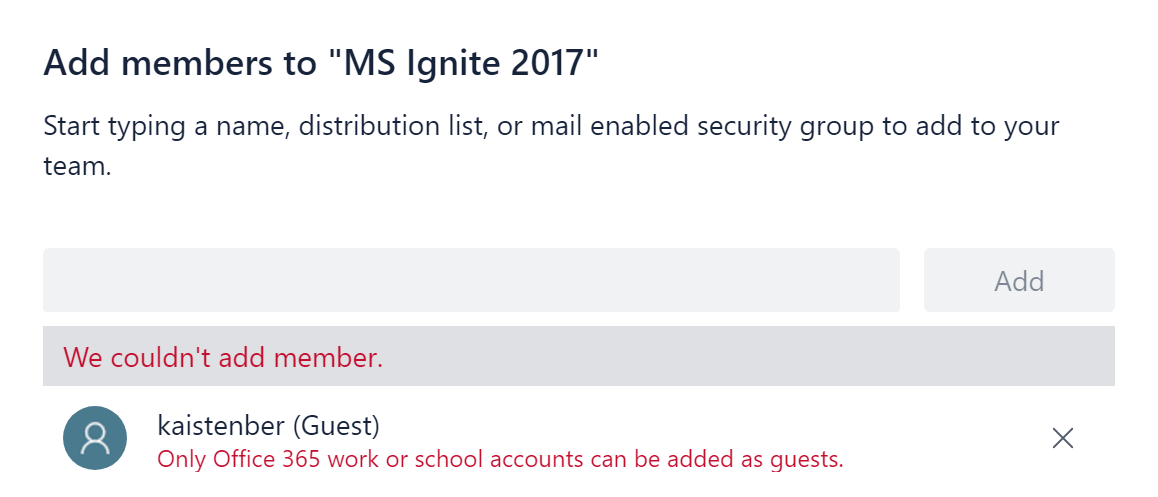
As this shows you where I tries to add a guest user to one of my Teams


Then we get this message


Your account has to be O365 business or school account.
If it's one of them well then there is no problem to get this new feature running.

07/09/2017

Windows 10, Surface PRO 4 and Sennheiser MB660 MS UC

The last days I got my Sennheiser MB660 MS UC. At the first time I plugged it to my Surface PRO 4, running Windows 10 PRO Insider Preview Evaluation copy. Build 16281.rs3_release.170829-1438, who worked smooth on my Plantronics Voyager Focus UC. When running the dongle on the MB660 it works fine. The drivers got where they should, and the Sennheiser update installed the latest firmware for the dongle and headset.


06/09/2017

Windows 2012R2 S4B Cannot install KB2982006 – This update is not applicable to your computer

It's time for a classic with a twist.
As we know there is an issue installing Skype for Business server on windows server 2012R2. You have to download the KB2982006 update and installed it.

29/08/2017

Microsoft Ignite less than 30 days

Since I did not partisipate on last year on MS Ignite. My company is sending 2 persons this year. It's my Co-worker Ivar Naggum and my self.
Most of the stuff that I will look into this year at Ignite will be about O365, some Skype for Business Online and Azure.
There will come lots of bloggs and tweets from this years event.
You can read about Ignite here
https://www.microsoft.com/en-us/ignite

I hope to see you at Ignite in Orlando.

08/08/2017

DNS vs HLB Skype For Business

I have the last half year build serveral Skype for Business solutions where we have implemented Enterprise Edition.
Based on what several MVP and Microsoft best practise they recommend DNS LoadBalancing.
When reading on TechNET this is one of the article about Loadbalancing
https://technet.microsoft.com/en-us/library/gg615011.aspx?f=255&MSPPError=-2147217396
As mentioned in several bloggs and on Technet, well all say that searching for error is more easy with DNS LBA. Well that can be true because you don't have to search in HLB vml og physcal unit. But then you buy a HLB without a service and support agreement? And if it's critical you buy a 24/7/365 4 hours responce time agreement.
If you look at downtime based on how client works and what is said around. The Skype for Business client shall do it better than older clients. But is this the fact?

14/06/2017

http to https redirect for KEMP Loadmaster

More and more customers are going for KEMP Loadmaster as reverse proxy. Often the question about http port 80 redirect inside KEMP Loadmaster to https 443 and then to a realserver who runs 8080 or other ports.

Then just follow these steps
To redirect from HTTP to HTTPS, follow the steps below in the LoadMaster Web User Interface (WUI):


  1. Create a Virtual Service on the IP address you use for HTTPS on port 80. This service will act as a redirector and does not need Real Servers.
  2. Once created, on the Virtual Service modify screen, expand the Advanced Properties section.
  3. In the Not Available Redirection Handling section, select 302 Found as the Error Code.
  4. Enter the URL to redirect to in the Redirect URL text box. Click Set Redirect URL. You may use the wildcards %h and %s to represent the requested hostname and Uniform Resource Identifier (URI) respectively.
then under redirect url add https://servicedesk.domain.com

After the public DNS has been created and the FW is open for port 80 for this service well then KEMP will do it's magic.

You can try it from your browser and type in: http://servicedesk.domain.com and you will end up in https://servicedesk.domain.com

Soure: KEMP Technologies

13/06/2017

Office web app server (WAC) and HLB

One of my customer who I have build a Skype for Business as a service for are running KEMP Loadmaster in a HA environment.
One of the things we did was to HLB WAC server. This is how we did it:
1. install the frist WAC server and with a certificate
2. Create the farm with external and internal URL https://owaweb.domain.com/hostring/discovery
3. check the farm and that the service running
4. Then install the second WAC server with the same certificate as on the frist one
5. Get the machine to Join the farm by this Command
New-OfficeWebAppsMachine -MachineToJoin wac1.domain.com
More about it here: 
https://blogs.technet.microsoft.com/jenstr/2013/03/18/creating-an-office-web-apps-server-2013-farm-with-2-machines/

Make sure that its all in the S4B topology, the farm is defined. Also the internal and external DNS records for the farm, pointing to KEMP Loadmaster. Open for port 443 in the Firewall


On the  KEMP Loadmaster just use the template, then Add the VS using public ip and then connect to the OWA servers on your internal network and let KEMP do the LoadBalancing.


After testing the solution where we duing a powerpoint presentation we did not have downtime, just a small freeze for 1 second for the presenter who run the powerpoint in Skype for Business.


If you want to know more about KEMP, and how to use KEMP please contact me since blinQ is the only KEMP Center Partner in the Nordic Area.


12/05/2017

KEMP new licensing model

since 1.april 2017 KEMP has come out with a new lisence model.
Watch this video to get information about it.
https://www.youtube.com/watch?v=e0Y90RqGvuw

19/04/2017

KEMP VIP - Webinar 30th May

As a part of beeing KEMP VIP, I have been asked to run a webinar for KEMP partners. The session will last for 1 hour. Customer cases we have done, how KEMP solved there challenges. The new lisencing model and the new KEMP 360 Central.
This will be a "non" tech session but it will give som pinpoints on how to use KEMP, Why use KEMP instead of Netscaler, F5 or IISARR/WAP-ADFS.

Update!!!
KEMP webinar with Kai Stenberg

Hope you will be there for this session.

07/04/2017

Jabra Speak 710 Large room

Just got from Tektrakom in Norway the new Jabra Speak 710. This is a new version of the Speak 510 but now with som new features.
One of the great things is that I just paired it without use the bluetooth stick on my computer.
Just one click on the Speak and it pair/connect with each other. Just nice good. Tried also a conference on them, connected to Skype for Business, and on where i sit and one in a meeting rom about 30feet away, and this worked also.
So far this looks nice and works fine.
Charging with USB, connec to computer either with USB, Bluetooth direct or the stick that comes with it. Pairing so easy.

Update 1:
The kids tried it on their computer runing Viaplay, and watching movie on one of the computers. They where very happy about them. They said that sound was great.

Update 2:
To get them working on Windows 10 is very easy, just let it be installed by bluetooth, and if you have two you want to connect together, just press the connect button on the front on them and you are connected or you can use the bluetooth pin that follows it.

I have now installed them on my computer the Surface 4. Runing Spotify, and it works very good.
If you want try them out don't hasitate to contact me or blinQ.no

31/03/2017

New version of KEMP Loadmaster software

Hi, it's been a long time since my last blog post. This has to do with long days and all to much work to be done.
Well, here we are again. This time wiht news that KEMP Tech is about come out with a update for theire KEMP Loadmaster.
The new version is 7.2.38 who they will present 3dr April 2017.
https://kemptechnologies.com/blog/new-loadmaster-release-7-2-38/

Some of the news is that there is support for Windows server 2016 Hyper-V, Secure FTP (SFTP for backup).
New support model


The new software will be out on monday....so this is early news for you.

13/02/2017

Cloud or non cloud

Cloud or Non cloud.....that's the question?
Are you thinking about to get your Skype for Business in the Cloud or OnPrem? Cloud or Non Cloud. Hosted or Non hosted? Well this are important infrastructure and company policy that has to be considered.
In the most of Europe Microsoft can't at the present time offer any more than PSTN Conferencing over the Office365 Skype for Business Online......

31/01/2017

An old classic that needs a reminder

Noticed something interesting here the other day. After change of IP for Edge in public IP and internal aswell. When we got the routing inplace.
Note to my self.......remember to reboot the Edge server even if the topology has been published.

Otherwise you will get funny errors where Desktop sharing or Application sharing doesn't work and ofcourse the FW is configured correct.


Confusing....amusing :-)

12/01/2017

WAF on KEMP Loadmaster

When customers or persons out there, use KEMP for other stuff than Reverse Proxy or HLB for Skype for Business. We as a KEMP  Center Partner see often that they use it for IIS.

Other will protect their IIS solutions and here is a tip about this.
If you have a IIS that us HLB and use WAF (Web application firewall) and has a subscription from KEMP for it, well then use the following settings running only IIS on the Realserver.

Under Settings for the VS, WAF settings and then choose the IIS rule and not the generic rule. This is why:
If there is information passing through the website such as user details or going to a database it would be recommended to us the Application Generic rules such as SQLI and XSS. However if Application Generic rules are applied it is not possible to apply Application Specific.

And please turn on Audit Mode to Audit Relevanse. If this is not turned on, then you might get no loggs on the WAF.

One other thing about WAF is that when you turn it on, well then you get a message 1 out of 8 VS are enabled. What does this mean?
Well, this say that you have 4 GBRam for your WAF, and each VS running WAF takes out 512 MB Ram. If you find out that you need to have eg. 16 VS running WAF, well then you have to double your memory for your Loadmaster.

Hope this explains a lot about this subject.

27/12/2016

2016 fading out.......2017 is about come

Well, what a year 2016 has been. Lots of stars has left us. From David Bowie, Lemmy and last Carrie Fisher.
Well, as a Skype for Business consultant, this year has been great for me. Lot's of interesting projects. New job at #blinQ. Building a company from the beginning. KEMP VIP status and blinQ got as the frist in Nordic Area KEMP Center Partner.

Microsoft has pushed out more new features in Office365. The new MAC client finally got here.
Skype Operations Framework will now be a important part of how we shall deliver projects.

Someone out there in LinkedIn said that in about 2 years time the Skype for Business consultant role has gone and that companies do not want to hire them anymore.
I will not agree to that, our role as advisor, since we know how the EV works, and in the Nordics where I work Microsoft can hardly deliver EV functionality in O365. Lots of companies has hybrid solutions, so I will not agree. Maybe it's different in UK or US since they have O365 with EV. But what about Attendant or Contact Center? How can you fix that in O365? Microsoft does not have this and when terminate SIP trunk, you can do that is Azure, but then we are talking about a new game, and the UC Consultant was not dead after all :-)

Thanks to all my readers, an I'll be back next year.
Happy new Year


21/11/2016

KEMP VIP

As some of you have read on LinkedIN. Norway has now got their first two KEMP VIP's.
I feel real proud to be one out of two.
As a KEMP VIP & KEMP Champion I will get to see what's will come on KEMP. We will also get first hand on the news.
There will be meetings with the developers, we can come up with ideas, make blogs for KEMP and be early out in the news.

If you want to know more about KEMP, well as I see it there are just one KEMP Center at present time in the Nordic, and that is blinQ AS.

Just take contact if you want to know about LBA, Reverse proxy replacement or anything around KEMP Loadmaster.


04/10/2016

Headset is important for Skype for Business

As you noticed earlier on this blog, so have I written some bloggs about different headsets. As you can see from the search I done on my blogg:
Search for headset on my blogg

Well at this time there has been lots of good one and some not so good. But tomorrow this all will change again when Sennheiser will give me try for the new MB-660.

Based on that I have read about it already, well this is something that I am looking forward to. Will it be as great as the Plantronics Focus UC ?