18/05/2018

Test Jabra Engage 75 [**UPDATE**]

From Tektracom I got the new Jabra Engage 75 MONO today as I wanted to test it out.

Jabra Engage 75 
As we can see we have a docking to charge headset. Listen to music from Spotify works smooth. One thing I think was not so good is that the first I had to do was to update the firmware on it. It comes with an old firmware, but since this is a new headset and new on marked, I was expected it to have the latest one.

After the upgrade it was just a quick config on what I shall use it for.
I have testet it around in my office and since it has DECT standard it works all up at 10th floor when the base was in 8th floor. 
That is real nice and impressing.

Would I buy this for people, YES. As a office headset it's real nice to use.
Since it has DECT it quite expensive but its just fine and nice to use.
I will give it and 5 on the dice.

**UPDATE**
Since it' based on new DECT technologi it will give better distance. I tried it during useing the office elevator here at work, and the cool thing is that I tried it with my co-worker Ivar Naggum, and he keept the call up all time (#Skype4B ) call, and when I got back in the DECT zone it continued the call. Real nice and smooth I think.

03/05/2018

KEMP MELA Webinar 9th May 2018 2pm CET

Hi dear readers.
As mentioned earlier, I will have a KEMP webinar. This is what they say about it.


KEMP Technologies like to invite you to their latest expert series webinar where KEMP All Star Influencer, Kai Stenberg from KEMPCenter Partner, BlinQ AS, will share his experience of implementing KEMP LoadMasters for customers across Europe.
Kai will share his unique insights on how Enterprises are deploying KEMP's centralised application delivery management platform (KEMP 360) and capacity based licensing model (MELA) to achieve greater flexibility, scalability and ROI.

Key Learning Points:
  • Legacy ADC architecture vs. the future
  • The use cases and benefits of Metered Licensing (MELA)
  • Metered Licensing administration
  • Discover how KEMP 360 Central provides centralised management and control of Application Delivery assets
  • CloudX (BIZSKYPE) customer success story


Please sign up and I look forward to have you there.

21/03/2018

KEMP webinar about MELA - Pay as you grow [**Updated**]

As most of you know, I have been granted the title from KEMP Technologies as a KEMP VIP. One case I have been working on is this one:
KEMP MELA - PAY AS YOU GROW
This day I noticed that KEMP has asked me to run a webinar based on the MELA and how it works. This is something I real look forward to do again.
As many of you know I work for the one and only KEMP Center Partner in the nordics. And for me and blinQ AS this is important.
With the MELA you pay for what you are useing. All by the KEMP Central 360 where you can manage your VLM's. Upload firmware, reconfigure or what you want to do.

All this and how, where and why will be covered in this webinar.

[**UPDATE**]
Date and time has now come. 9th May 2018 at 2PM CET link for registration will come soon, so just check in later.

[** UPDATE 2**]
This will be an international webinar on english

20/03/2018

Skype for Business CU Mars 2018 [**UPDATE**]

Microsoft has launched CU for Skype for Business server, this time Mars 2018. This gives build


You can download it here Latest CU Mars 2018

Since my last blogpost about the Desember 2017 this might be one for you. I am about to try it out now. If I find something about it. Be sure to read about it here.

Update!!!!!
After installing it the error contains screen sharing isn't allowed for this contact is now gone.

05/03/2018

Skype for Business server CU desember 2017 [**BE AWARE**]

After installed the Desember 2017 CU for Skype for business Update 6.0.9319.510 there is a huge bug in this versjon.
When clients tries to share desktop they will get this error.


You have to contact Microsoft Support and create a ticket to get the update.  As it say on the post
To obtain this update, submit a request to Microsoft Customer Service and Support through the following Microsoft website: http://support.microsoft.com/contactus/?ws=support
After installing you will then be on 514 for your build.

18/02/2018

My experience with Plantronics Voyager 6200 UC

As mentioned before this weekend I got the Voyager 6200 UC. Since I have the Plantronics HUB installed all the install went smooth even that I am running Windows 10 Insider version.

After listen to music and also had a Skype for Business meeting, well I think this a really good quality headset.

16/02/2018

Plantronics UC-6200

Finaly, after weeks waiting now it's here. This I will look forward to try out.
The design looks great.
Thanks for it Plantronics Norway :-)

Going to write about over the weekend to tell how I it is. #thenextbigthing

08/02/2018

Create Teams Online meeting from Outlook [**SOLVED**]

I am not sure how many out there that has run the invite to a Teams meeting from Outlook. But for me I have never had the ad-in and therefore not able to use it.
So as you might understand, I now has it and here is how I solved it.
From a lots of google search here to try to figure it out I found out this fix.
Great thanks to this blog: https://realtimeuc.com/2017/08/missing-teams-outlook-add-in/

1. locate where you have the addin for Teams. Mine is located here:  C:\Users\<usern name>\AppData\Local\Microsoft\TeamsMeetingAddin\1.0.17306.2\x64
2. make sure you backup your registry before you does something like this
3. copy this registry file and create a .req file in Notepad or other tool to get this.

26/01/2018

Windows 10 Insider and Bluetooth latest in Fastring

As the gadget nerd I am, when running Windows 10 Insider in the fast ring can give some challenges.
The build 17084 that come out yesterday gave me lots of trouble.
So today I had to rollback to get my Senneheiser MB 660 UC to work again.

So now I am running build 17074 after a quick restore. Hope the next version will be better :-)

Have a great one.

04/01/2018

Huddy Camera part 2

I have if you read my blogpost seen that I have got the Huddly camera. I have been testing it on my Surface PRO 4. I use Skype for Business on regular basis.
Today I testet the camera in a Skype4B call with a customer to try it out.
First we connected using the Sureface build in camera, and it was OK. Then I switched to the new Huddly Camera and WOW.
The wide 150 degrees, the zoom and the customer of mine said. WOW what a difference. The way to handle the camera during meeting or call is real nice and smooth.
The size is perfect to bring with your personal computer or if you want to use it in a conference room. I think this will get a lot's of places where you can use this.

If you want to know more or try it out. Please contact me or blinQ AS in Norway and we can help you with this.

02/01/2018

Hyddly Camera

Welcome back to new year and new fun. When I got back from x-mas holiday and returned to my job, I had a new camera on my desk. I got my Huddly Camera.
See more about it on


I have just start to use it and it looks out real good so far. It's small and real compact and the specs is just brilliant. Works well on my Surface PRO 4 on Windows 10. More about testing it will come as soon I got some more to report, but it's nice.
Just download the latest software from Huddly and then you are good to go.

15/12/2017

EWS error, EWS Not fully implemented [SOLVED!!] [UPDATED!!!]

Lately I have start to see this type of error, either where EWS internal URL is blank also the External URL.


The Skype for Business is running on Windows server 2016, Exchange 2016 and Hybrid to O365. After lots of Google on this. Added Kerberos for Skype for Business. Changed OAuth certificate but the client got prompted about for Exchange credential all the time and it did not help at all give this to the client.
It was now time to ask my co-worker Ivar Naggum who is the Exchange Expert at blinQ about this, and together with Alexander Tuvström who was from the customer

07/12/2017

All from headset to Skype4B Hybrid issues to an interview

It's been a while since my last blog. So this will contains a lots that has happened lately.
So lets go........
Yesterday 6th Desember 2017, I was interviewed by a journalist who is going to write something about KEMP Technologies, MELA, KEMP 360 Central. Looking forward when it comes out. Was great, and this how we KEMP VIP's does it. Want to know more about KEMP Loadmaster, well contact me or blinQ AS, and we can give you an introduction to the world of  Harware LoadBalancing and how to use it as a reverse proxy.

09/11/2017

Skype for Business - Windows server 2016

As we know with the CU from May 2017 we now have support fort Windows server 2016.
Today I started to install this Onprem for a customer.
Just be aware of that this blog here tells about it:
https://blogs.perficient.com/microsoft/2017/08/skype-for-business-how-to-install-on-windows-server-2016/
And it works like a charm. I have not tried the registry hack that is mentioned here, but just after step 2 I installed the fix for it, and then the CU.

Good look it works just fine :-)

25/10/2017

Microsoft Teams Roadmap

Yesterday I got an e-mail that made me happy. I got the new roadmap for Microsoft Teams.
You can read all about it here:
Roadmap

The PowerPoint presentation can be read from this link.
PDF Roadmap

Be aware that dates can changes. From my perspective I think this is what IC is about and one of the feature that I like that comes soon is the integration between Skype for Business Persistent Chat and MS-Teams integration.

10/10/2017

Azure Stack - KEMP Technologies

Finally Azure Stack has arrived. In Norway there are different companies that can deliver this service. Azure Stack is Hybrid Azure, where you combine Azure and Azure Stack.
But did you know that KEMP Loadmaster is the one and only LBA/ADC in Azure and Azure Stack.
And if you plan to move your environment to Azure and Azure Stack, and you are already a KEMP customer, then you can move your license to the new environment.
If you new to KEMP and planning to move into Azure or Azure stack, then I would recommend that you talk to a KEMP Center Partner. Complete list will you find here:
https://kemptechnologies.com/partners/directory/

For Norway we have 1 KEMP Center Partner who has the knowledge and has educated sales and tech's for this:
KEMP Center Partner in Norway


04/10/2017

Back from MS Ignite 2017 in Orlando

Last week there was a great time for the Geeks like me. MS Ignite 2017 happen in Orlando. Huge and bigger than ever. They said there was about 30 thousand there. It was so big that they had to have it in 3 buildings. Something that made a lot's of walking. According to one of my friends we walked about 65 km that week.
The EXPO are was big and very interesting to meet all the sponsors, and to see how and what they can deliver in a ECO system.

12/09/2017

MS Teams now with Guest users...or .......

As one of the new features of the MS Teams that Twitter runs over with, is that we can have Guest user access in Teams.
Well to add a user is real easy, but there is some limitation about it.

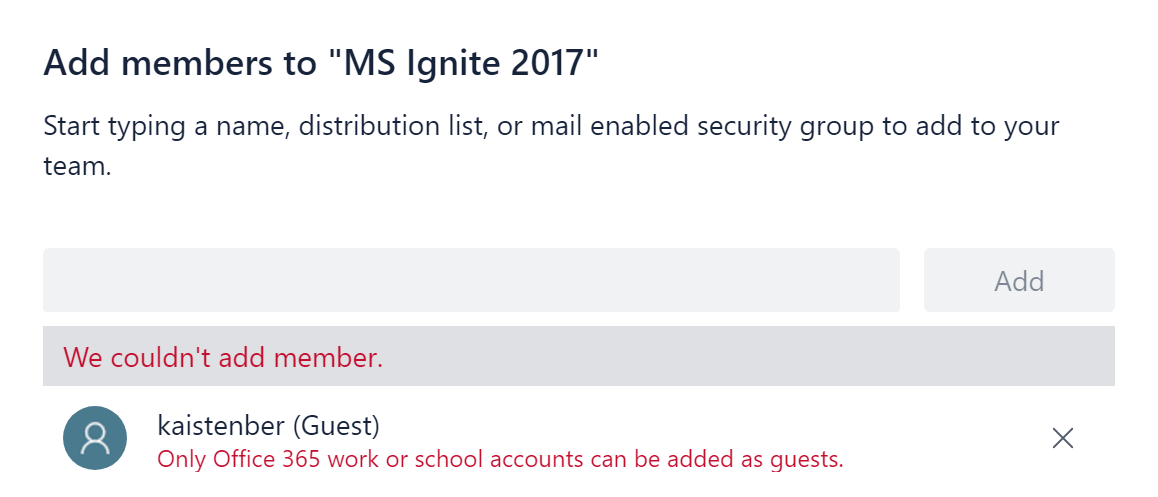
As this shows you where I tries to add a guest user to one of my Teams


Then we get this message


Your account has to be O365 business or school account.
If it's one of them well then there is no problem to get this new feature running.

07/09/2017

Windows 10, Surface PRO 4 and Sennheiser MB660 MS UC

The last days I got my Sennheiser MB660 MS UC. At the first time I plugged it to my Surface PRO 4, running Windows 10 PRO Insider Preview Evaluation copy. Build 16281.rs3_release.170829-1438, who worked smooth on my Plantronics Voyager Focus UC. When running the dongle on the MB660 it works fine. The drivers got where they should, and the Sennheiser update installed the latest firmware for the dongle and headset.


06/09/2017

Windows 2012R2 S4B Cannot install KB2982006 – This update is not applicable to your computer

It's time for a classic with a twist.
As we know there is an issue installing Skype for Business server on windows server 2012R2. You have to download the KB2982006 update and installed it.